TMS — Task Management, as simple as WhatsApp

Organize by Company → Employee, then send tasks or reminders in a chat your team already understands.

TMS — Task Management, as simple as WhatsApp

Organize by Company → Employee, then send tasks or reminders in a chat your team already understands.

How it works
Companies list

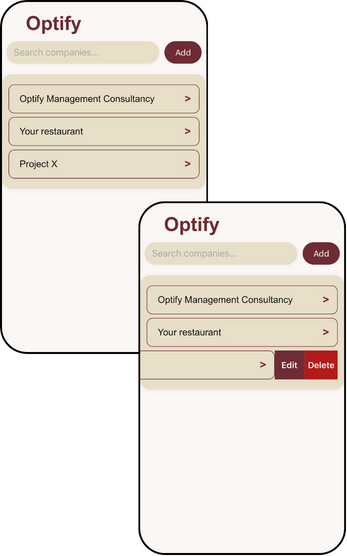
Tap Add to create a company; swipe to Edit/Delete; tap a row to open employees. (Your screenshots show “Company A / Company B”.)

Add companies; swipe to Edit/Delete; tap to open employees.

Employees inside a company

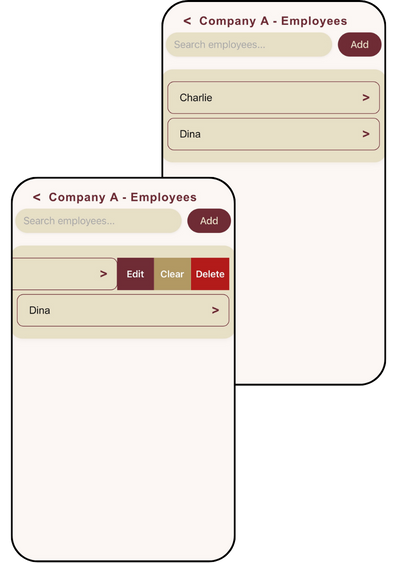
Search or Add a new employee. Swipe to Edit, Clear (wipe all items for that person), or Delete. Tap a name to open the thread. (examples: Charlie, Dina, Eve.)

Add employees; swipe: Edit • Clear • Delete; tap to open thread.

WhatsApp-style thread

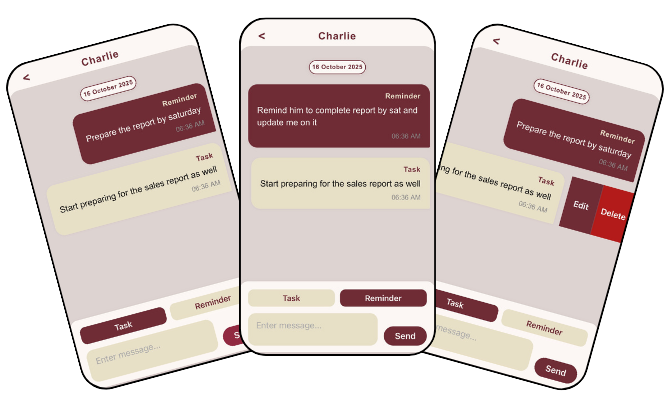
Choose Task or Reminder, type the message, set date/deadline, Send. Items group by date in a clean timeline; swipe a bubble to Edit/Delete.

Pick Task/Reminder → type → set date → Send. (Swipe to Edit/Delete.)

How it works

Companies list

Tap Add to create a company; swipe to Edit/Delete; tap a row to open employees. (Your screenshots show “Company A / Company B”.)

Add companies; swipe to Edit/Delete; tap to open employees.

Employees inside a company

Search or Add a new employee. Swipe to Edit, Clear (wipe all items for that person), or Delete. Tap a name to open the thread. (examples: Charlie, Dina, Eve.)

Add employees; swipe: Edit • Clear • Delete; tap to open thread.

WhatsApp-style thread

Choose Task or Reminder, type the message, set date/deadline, Send. Items group by date in a clean timeline; swipe a bubble to Edit/Delete.

Pick Task/Reminder → type → set date → Send. (Swipe to Edit/Delete.)

Give tasks the way people talk.

Give tasks the way people talk—log tasks and reminders as you talk, and share clear next steps before you leave the room.

We’ll tailor fields, exports, and features to your workflow.
and we’re happy to take any suggestion